NYC School Shop
Anker Docking Station, 5-Port Dual Display, 85W Max Charging for Laptop, Single 8K@30Hz or Dual 4K@60Hz Display, for macOS and Windows
Anker Docking Station, 5-Port Dual Display, 85W Max Charging for Laptop, Single 8K@30Hz or Dual 4K@60Hz Display, for macOS and Windows
Couldn't load pickup availability

Connectivity Meets Compact
PowerExpand takes up hardly any space on your desk but gives you everything you need to power up your laptop, connect multiple monitors, charge your phone, and transfer data at eye-watering speeds.
Fast-Charging to Multiple Devices
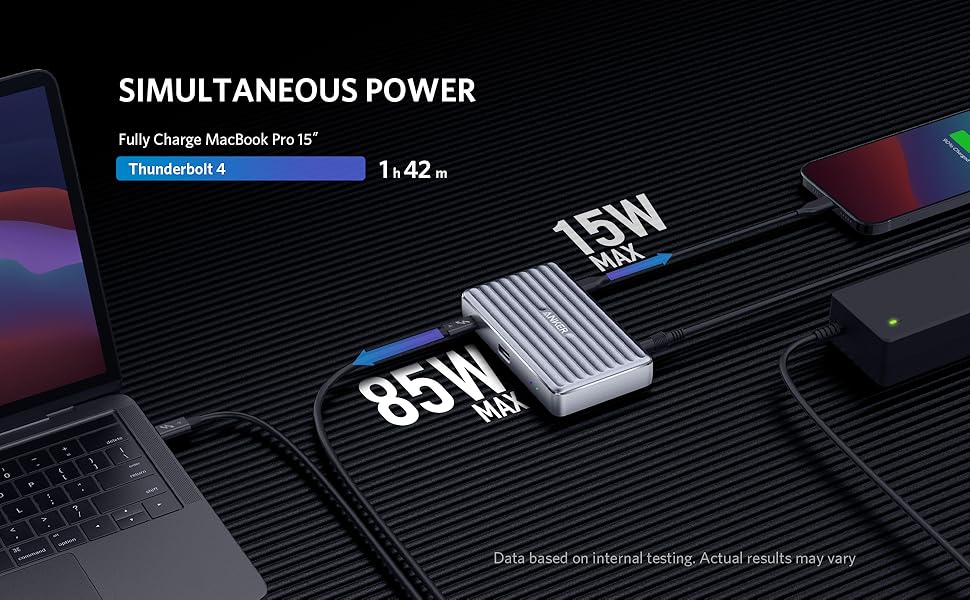
The 85W max Thunderbolt 4 upstream port provides enough power to fully charge a MacBook Pro 15″ in less than 2 hours, while 3 15W Thunderbolt 4 downstream ports can power up your mobile devices.
Increase Your Display Options
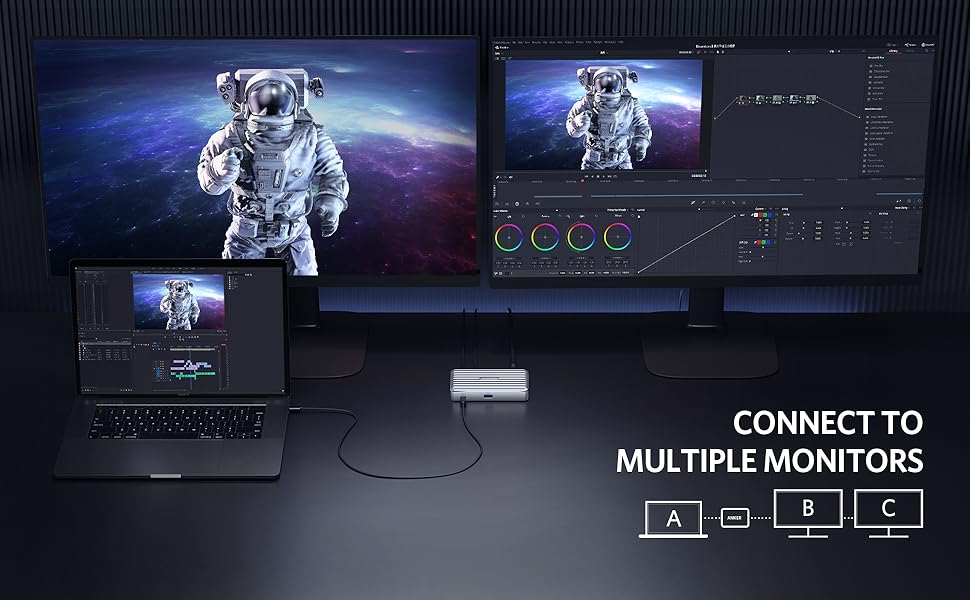
Stop wasting time switching back and forth between programs or documents—extend your display across multiple monitors via any two of the Thunderbolt 4 downstream ports for an easier and more productive experience.

Transfer Files at High-Speed
Transfer movies, photos, and music at speeds of up to 40 Gbps via the 3 Thunderbolt 4 downstream ports, or up to 10 Gbps via the USB-A data port.
Frequently Asked Questions
Q1: Will this dock work with any laptop? How do I make sure my laptop works with this dock? What kind of cable should I use to connect the dock to my laptop?
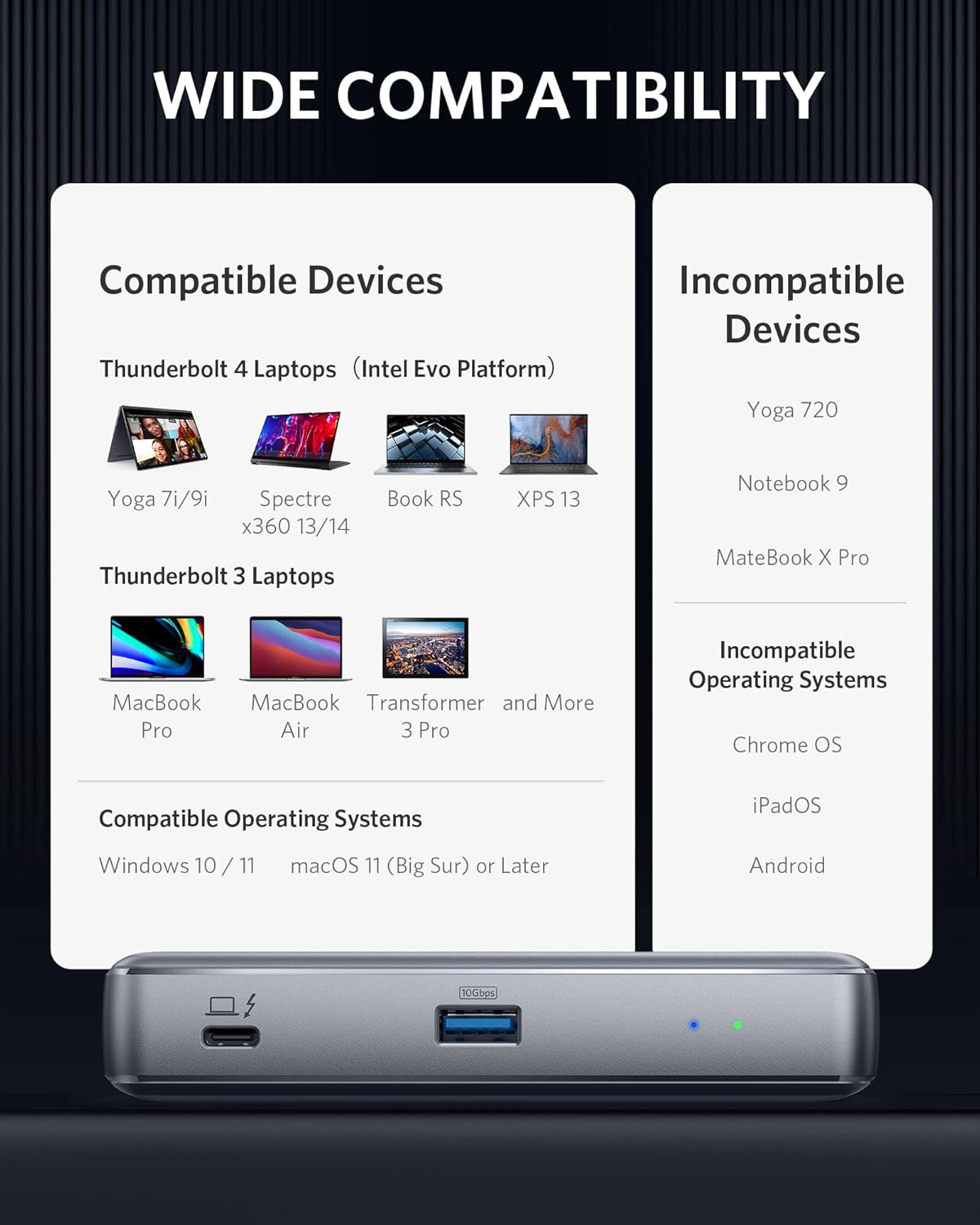
A1: This dock works with Windows 10 laptops equipped with Thunderbolt 4, and MacBooks running macOS 11 (Big Sur) or later. It doesn’t work with Linux or Chrome OS laptops, Thunderbolt 3 Windows laptops, or M1 MacBooks. It’s recommended that you use the included Thunderbolt 4 cable. If you need to use a different cable (due to loss etc.), then another Thunderbolt 4 cable would also be compatible.
Q2: I have a Windows 10 laptop with Thunderbolt 3 ports, will it work with this dock?
A2: For Windows 10 laptops with Thunderbolt 3 ports, we’d recommend a Thunderbolt 3 dock.
Q3: I have a laptop with two Thunderbolt 4 ports, but I have 2 external displays that only have HDMI inputs. How do I use them with this dock?
A3: You can use either a USB-C to HDMI cable or a USB-C to HDMI adapter to connect the dock to your external displays.
Q4: How many external displays can this dock support and what are the maximum resolutions?
A4: This dock supports connection to two external monitors via the USB-C Thunderbolt 4 downstream ports.
Below are the maximum resolutions:
1) Single monitor: Windows - 8K (7680 x 4320 @ 30Hz); macOS - 5K (5120 x 2880 @ 60Hz)
2) Dual monitor: 4K (3840 x 2160 @ 60Hz)
Q5: Why does the dock feel warm?
A5: When charging or transferring data at high speed, the dock’s temperature may increase. This heat is dissipated through the aluminum exterior, so it may feel warm to the touch. Don't worry, this is within the normal limits of the dock’s operation.
Q6: The charging output of the dock is listed as 85W, which is lower than my MacBook charger’s output. Will the dock still be able to power my MacBook?
A6: This dock supports up to 85W of charging via the Thunderbolt 4 upstream port (indicated by a computer icon). Power is dynamically distributed between this port and other power ports depending on the power requirements of connected devices. Therefore, sometimes the charging speed will be slower than the original laptop charger.

PowerExpand 5-in-1 Thunderbolt 4 Mini Dock
|

PowerExpand Elite 12-in-1 Thunderbolt 4 Dock
|

PowerExpand 7-in-1 Thunderbolt 3 Mini Dock
|

PowerExpand Elite 13-in-1 Thunderbolt 3 Dock
|

PowerExpand 13-in-1 USB-C Dock
|

PowerExpand 9-in-1 USB-C PD Dock
|
|
|---|---|---|---|---|---|---|
|
|
|
|
|
|||
| Customer Reviews |
408
|
684
|
173
|
1,437
|
2,358
|
495
|
| Price | — no data | — no data | $49.99 | — no data | $199.99 | $69.99 |
| Power Input | DC-IN (20V/5A) | DC-IN (120W) | AC-IN | DC-IN (20V/9A) | DC-IN (20V/6.5A) | DC-IN (100W) |
| Charging for Laptop | Max 85W | Max 90W | 36~45W | 85W | 85W | 60W |
| Charging for Phone | 15W | 20W | no data | 18W (Power Delivery) / 15W (Thunderbolt 3) | 18W (Power Delivery) | 20W |
| Data Transfer Speed | Up to 40Gbps | Up to 40Gbps | 10Gbps | Up to 40Gbps | 10Gbps | 5Gbps |
| Maximum Resolution | 8K@30Hz | 8K@30Hz | 4K@60Hz | 5K@60Hz | 4K@60Hz | 4K@60Hz |
| Gigabit Ethernet | ✓ | ✓ | ✓ | ✓ | ✓ | ✓ |
| Audio In & Out | ✓ | ✓ | no data | ✓ | ✓ | ✓ |
| SD / TF Slots | no data | SD Slot | ✓ | SD Slot | ✓ | no data |
| Dimensions and Weight | 4.9 * 2.8 * 0.9 in / 8.8 oz | 7.3 x 2.9 x 1.3 in / 16.5 oz | 4.3 * 3.5 * 1.2 in / 7.9 oz | 4.9 * 3.5 * 1.6 in / 17.3 oz | 4.9 * 3.5 * 1.6 in / 13.1 oz | 5.7 * 2.5 * 1.0 in / 6.64 oz |
| What's Included | 100W power adapter, 3.9 ft power cord, 2.3 ft Thunderbolt 4 cable | 120W power adapter, 3.9 ft power cord, 2.3 ft Thunderbolt 4 cable, QSG | AC power cord, 2.3ft Thunderbolt 3 cable, Manual | 180W power adapter, 3.9 ft power cord, 2.3ft Thunderbolt 3 cable, Manual | 135W power adapter, 3.9 ft power cord, 3ft USB-C to USB-C cable, Manual | 100W power adapter, 3.9 ft power cord, 3.3 ft USB 3.1 Gen 2 USB-C to C cable, Manual, QSG |
- Compatibility Information: Works with Windows 10 laptops equipped with a Thunderbolt 4 port (Intel Evo Platform), and MacBooks running macOS 11 (Big Sur) or later.
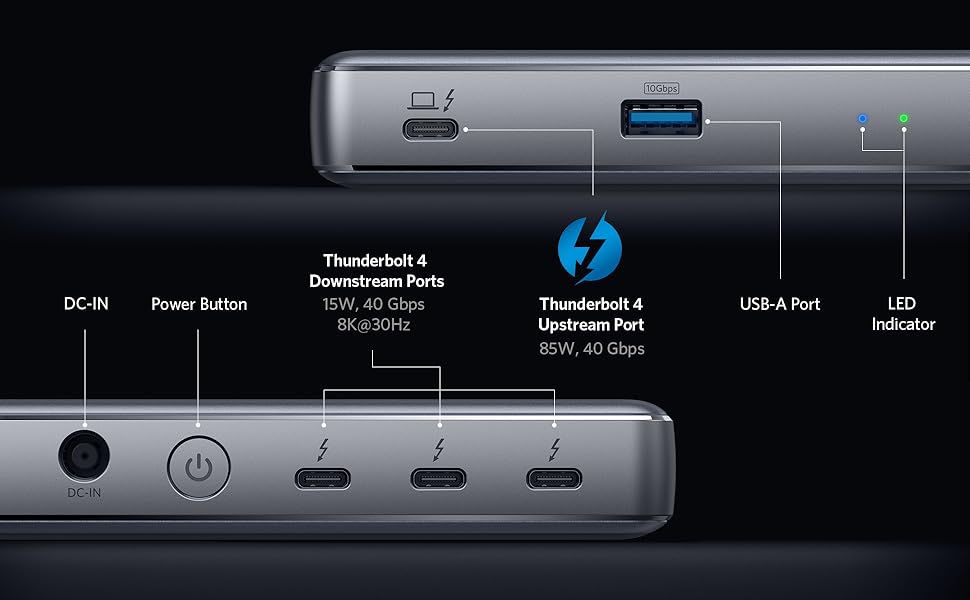
- Huge Expansion: Equipped with an 85W Thunderbolt 4 upstream port (connects to your laptop), 3 Thunderbolt 4 downstream ports, and 1 USB-A port.
- Charge and Transfer at High Speed: Connect your USB-C laptop to the Thunderbolt 4 upstream port to get a powerful charge up to 85W, or connect mobile devices to the 3 other Thunderbolt 4 ports to get a 15W charge. The 3 Thunderbolt 4 downstream ports also support data transfer speeds of up to 40 Gbps—enough to transfer a 20GB file in just over 10 seconds.
- Media Display: The Thunderbolt 4 downstream port supports media display to a single monitor in up to 8K@30Hz, or to dual monitors in up to 4K@60Hz.
- What You Get: PowerExpand 5-in-1 Thunderbolt 4 Mini Dock, 100W power adapter, 3.9 ft power cord, 2.3 ft Thunderbolt 4 cable, welcome guide, 18-month warranty, and friendly customer service.
| Brand | Anker |
| Color | Phantom Gray |
| Hardware Interface | USB Type C |
| Compatible Devices | MacBooks, Windows |
| Total USB Ports | 4 |
| Product Dimensions | 4.9"L x 2.8"W x 0.9"H |
| Number of Ports | 5 |
| Item Weight | 5.92 ounces |
| Total HDMI Ports | 2 |
| Wattage | 100 watts |