NYC School Shop
GAOMON PD1161 Drawing Tablet with Screen, Digital Art Tablet with Battery-Free Stylus, Tilt, 8 Shortcut Keys for Paint, Design, Illustration, Editing, 11.6-inch Graphics Tablet for Mac, Windows PC
GAOMON PD1161 Drawing Tablet with Screen, Digital Art Tablet with Battery-Free Stylus, Tilt, 8 Shortcut Keys for Paint, Design, Illustration, Editing, 11.6-inch Graphics Tablet for Mac, Windows PC
Couldn't load pickup availability

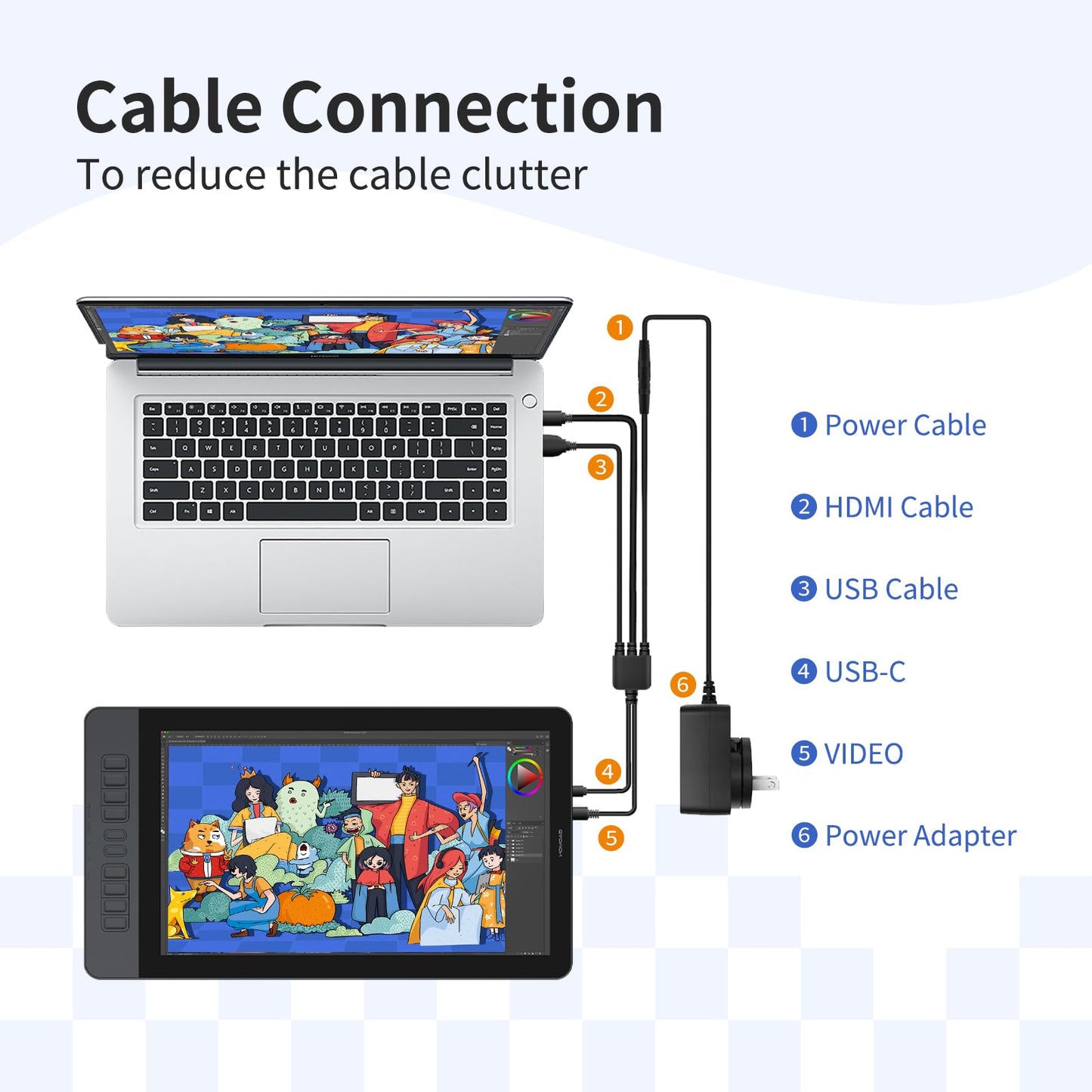
GAOMON PD1161 drawing tablet is not a standalone tablet, It must be connected to a laptop or computer to work. kindly note that insufficient power can cause the PD1161 to malfunction. Using it with the external power adapter connected.And remember extra pen nibs are stored in the pen holder.
-

Paper-like Canvas
The anti-glare film bring you the paper feel to the screen and minimal reflection.
-

High Definition Display
The full HD display provides you great clarity and true to life color quality.
-

Boost Up Your Workflow
8 buttons can be customized for any shortcuts helping you work with efficiency and ease.
-

Versitile Compatibility
GAOMON PD1161 drawing tablet works seamlessly with most creative softwares on Mac and Windows PC.

Battery-free Stylus
With no need for batteries and 8192 pen pressure, you can draw on the PD1161 drawing monitor anywhere anytime with precise and responsive lines. Programmable pen buttons put your most used shortcuts with easy access.

Tip Tilt Support
Just tilt the pen, and the lines will automatically become thicker or thinner depending on the angle and weight you place down - just like a regular pencil.

Express Your Creativity
GAOMON PD1161 is a must-have for the morden-day artist especially beginners. Full HD display & responsive stylus help you draw & design more naturally

Edit Photo With Ease
You'd be surprised to know just how much easier photo editing can be with graphics tablet & digital stylus rather than computer keyboard & mouse.

Make Your Mark
Use GAOMON PD1161 to mark up Excel spreadsheets, PDFs, text documents or take notes in a way that’s so familiar, like you would with pencil and paper.

Work & Learn Digitally
Digital pen technology helps you annotate documents, make presentation, draw diagrams with ease while working from home or in a online class.
Compare Similar Drawing Tablets With Screen

GAOMON PD1161 |

GAOMON Pro 19 |

GAOMON PD2200 |

GAOMON PD1320 |

GAOMON PD156Pro |

GAOMON PD1561 |

GAOMON PD1220 |
|
|---|---|---|---|---|---|---|---|
|
Customer Reviews
|
6,779
|
2
|
6,779
|
6,779
|
1,992
|
6,779
|
38
|
|
Price
|
$169.99 | $649.00 | $349.99 | $189.98 | $269.99 | $288.99 | $169.99 |
|
Panel Size
|
11.6 inch | 18.4 inch | 21.5 inch | 13.3 inch | 15.6 inch | 15.6 inch | 11.6 inch |
|
Color Gamut Volume
|
100% sRGB | 99% sRGB | 130% sRGB | 100% sRGB | 120% sRGB | 100% sRGB | 100% sRGB |
|
Full lamination
|
✘ | ✔ | ✔ | ✔ | ✔ | ✘ | ✔ |
|
Resolution
|
1920 x 1080(16:9) | 3840 x 2160(16:9) | 1920 x 1080(16:9) | 1920 x 1080(16:9) | 1920 x 1080(16:9) | 1920 x 1080(16:9) | 1920 x 1080(16:9) |
|
Pen Technology
|
Battery-free Pen AP50 | Battery-free G-Pro Pen | Battery-free Pen AP32 | Battery-free Pen AP50 | Battery-free Pen AP50 | Battery-free Pen AP50 | Battery-free Pen AP50 |
|
Pressure Sensitive
|
8192 Levels | 16384 Levels | 8192 Levels | 8192 Levels | 8192 levels | 8192 Levels | 8192 Levels |
|
Tilt Support
|
✔ | ✔ | ✔ | ✔ | ✔ | ✔ | ✔ |
|
Express Keys
|
8 Express Keys | - | 8 Touch Buttons | - | Dial Key & 10 Hotkeys | 10 Express Keys | - |
|
OS Compatibility
|
Windows , Mac OS | Windows , Mac , Android, Linux | Windows , Mac OS | Windows , Mac , Android OS | Windows , Mac OS | Windows , Mac OS | Windows , Mac , Android OS |
- Please kindly note that GAOMON PD1161 drawing tablet is not a standalone tablet, It must be connected to a laptop or computer to work.
- [Create Right On Screen]: Sketch, draw and paint directly on the full HD 11.6" IPS screen of GAOMON PD1161 drawing tablet. And the pre-installed matte film on display makes it feel like sketching on paper while reducing uncomfortable glare and reflection at the same time.
- [Vivid Color Perfomance]: A combination of 72% NTSC (100% SRGB) color gamut and 16.7 million display colors enables to present your drawings in a more lifelike way with smoother color gradation on this drawing tablet for pc.
- [Battery-free Stylus AP50 ]: Say goodbye to the hassle of charging, GAOMON PD1161 graphics tablet includes a battery-free pen AP50 with 8192 levels of pressure sensitivity and tilt function, which is easy to control, giving you the familiar feel of standard pencil.
- [Customize Your Workflow]: The 8 press keys on the side of the PD1161 drawing monitor and 2 pen buttons can be programmble in the driver, which is great to get easy shortcus and improve workflow. Warm Reminder: it is not a standalone drawing tablet, so it should work with a computer running windows or mac OS.
- [Widely Applicable]: GAOMON PD1161 is more than just the ideal pen display tablet for beginner artist to draw, edit image or do design work. It also can be a digital writing pad to take notes, create mind-maps, draw diagrams, collaborate and more.
- [Versatile Compatibility]: GAOMON PD1161 digital drawing tablet works with PC (Windows 7 or later) and Mac (macOS 10.12 or later). It is compatible with wide range of creative softwares including Krita, Medibang, Blender, Photoshop, Sai, as well as many other applications and platforms for online education or remote work like OneNote, Microsoft Whiteboard, Zoom, etc.
| Brand | GAOMON |
| Connectivity Technology | HDMI, USB |
| Pressure Sensitivity | 8192 Levels |
| Operating System | Windows 7 or later, macOS 10.12 or later |
| Special Feature | 60° Tilt Support, Anti-glare protective film, Programmable Press Key |